
Vlynks
A Vlynk is an intelligence module. It watches your data continuously and feeds what it finds to the AI agent.
Two kinds of Vlynk
Section titled “Two kinds of Vlynk”Eleven Vlynks ship today, in two kinds.
Six are silent — no panel, no dashboard, no card of their own. They work in the background and their output reaches you through the agent: you ask a question, and the agent’s answer is better because a Vlynk was watching. These are Institutional Memory, Risk Calculator, Financial Control, Strategy Commander, Channel Performance Monitor, and Content Gap Analyzer.
Five also render a card or brief on your board. ROI & Break-Even, Customer Intelligence, Opportunity Detector and Client Health produce an on-demand insight card when you ask for it; the Morning Brief produces one proactively, once a day, on app open. You still reason with the agent about them — the card is the visible summary, not a separate app to manage.
The contrast with a source stays exact:
| Source | Vlynk | |
|---|---|---|
| Produces | A live card fed by an external account | Intelligence the agent consults (five also render an on-demand insight card) |
| You interact with it | Directly — you see the card | Mainly through the agent — the reasoning is the product |
| Answers | “What is my data?” | “What does my data mean?” |
A source tells you revenue was £4,200 last month. A Vlynk tells the agent that is the third consecutive month of decline.
What ships installed
Section titled “What ships installed”Institutional Memory only. It is the one Vlynk every account starts with.
The other ten are opt-in from the Marketplace. This changed in 0.4.27 — earlier versions pre-installed several, and we stopped, because intelligence you did not ask for watching data you did not choose is not a good default.
Installing
Section titled “Installing”- Open Marketplace in the rail
- Find the Vlynk
- Install
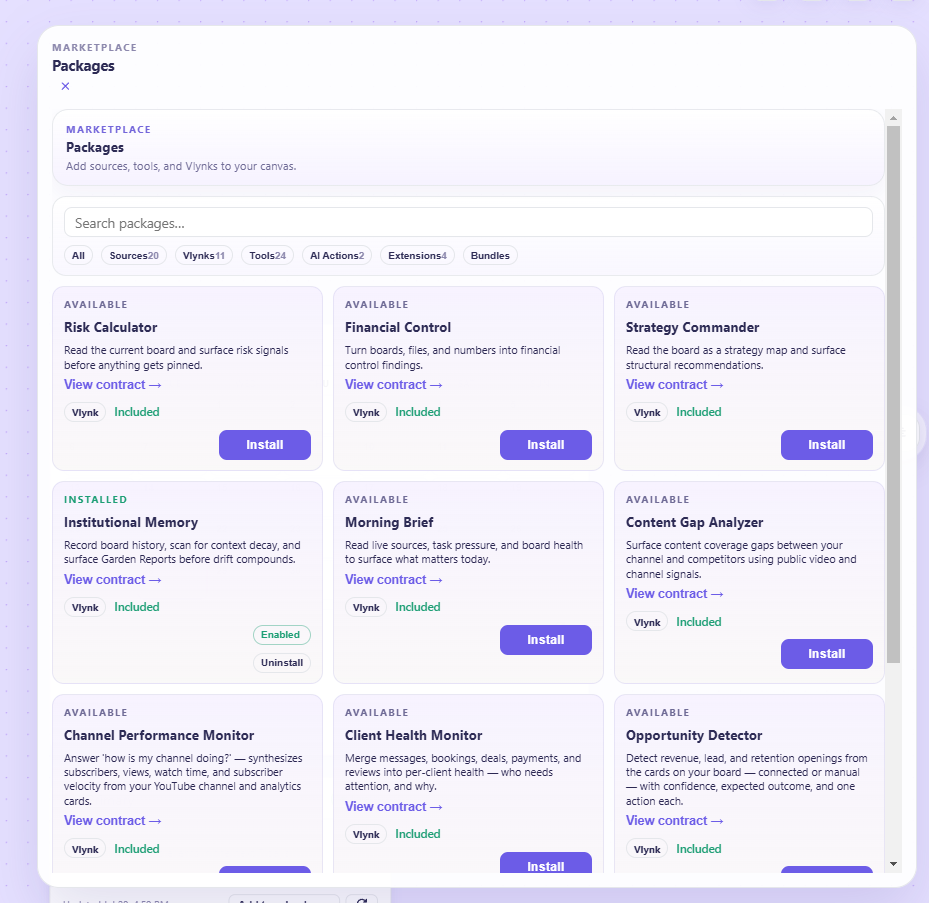
It starts working immediately. Most Vlynks depend on particular sources, and a Vlynk with nothing to watch stays quiet rather than inventing something — check its dependency before wondering why it is silent.
The Free plan holds three
Section titled “The Free plan holds three”| Plan | Vlynks installed at once |
|---|---|
| Free | 3 |
| Plus | Unlimited |
| Pro | Unlimited |
Reaching the limit shows an upgrade prompt. Nothing is uninstalled on your behalf — the limit blocks the next install, and anything already installed keeps running.
See exactly what a Vlynk does — before you install it
Section titled “See exactly what a Vlynk does — before you install it”A Vlynk reads your data and shapes what the agent tells you. That is a lot of trust to hand over on the strength of a name and a one-line description, so every Vlynk publishes an Intelligence contract you can read.
Open it with View contract → on the Vlynk, in the Marketplace or the Vlynk panel.
What the contract shows
Section titled “What the contract shows”What it does — a plain description of the job.
Reasoning prompt — the exact reasoning this Vlynk applies to your data. Not a summary of it, not a paraphrase: the actual instruction it follows. If you want to know why a Vlynk reached a conclusion, this is where the answer is.
Data access — split into two lists:
- Reads — what it can see
- Cannot access — what it is not able to reach
The second list is the one worth reading. A Vlynk that watches your revenue telling you plainly that it cannot see your calendar is a stronger statement than any assurance about it.
Published by — who wrote it.
It is view-only, and that is the point
Section titled “It is view-only, and that is the point”The contract is read-only. You cannot edit the prompt, and neither can anything else at runtime — it is published with the Vlynk and shown for transparency.
That is what makes it worth reading: a prompt you could change would tell you nothing about what the Vlynk actually does, and a prompt that could change itself would be worth even less.
Before you install
Section titled “Before you install”Open the contract first. Two questions it answers quickly:
- Does it need data I have not connected? A Vlynk whose Reads list is full of sources you do not have will stay quiet rather than do anything useful.
- Am I comfortable with what it sees? The Reads list is the honest answer, not the description.
The eleven
Section titled “The eleven”Institutional Memory (installed by default) — remembers decisions, context and history across your workspaces, so the agent knows what happened before. The one Vlynk that works regardless of which sources you have connected.
Morning Brief — assembles what changed overnight across your connected sources into one summary. It can also open proactively — once a day the agent greets you with a grounded read of your board, so you arrive to an answer instead of a blank chat. It is governed (never spammy) and fully under your control in Settings.
Opportunity Detector — watches for openings in your data: rising search terms, unusual engagement, patterns worth acting on.
Content Gap Analyzer — compares what you publish against what is being searched for. Needs YouTube or web sources.
Channel Performance Monitor — tracks your channel’s performance over time and flags meaningful movement rather than daily noise. Needs the YouTube sources.
Customer Intelligence — builds a picture of who your customers are from commerce and CRM sources.
Client Health Monitor — watches for clients going quiet, slipping engagement, and relationships needing attention.
ROI & Break-Even — tracks what you spend against what it returns, and where the line crosses.
Financial Control — watches revenue, costs and cash movement for the things worth knowing early.
Risk Calculator — surfaces concentration, dependency and exposure risks in your data.
Strategy Commander — the widest lens: connects signals across every source into strategic direction.
Using them
Section titled “Using them”You do not, directly. Install the Vlynk, then ask the agent — the difference shows up in the quality of answers, not in a new panel.
If you want to know what a Vlynk has noticed, ask for it: “anything I should know this morning?” or “what risks are building?” The agent consults whatever is installed and answers from that.
- Using the AI Agent — how Vlynk intelligence reaches you
- Connecting Sources — give your Vlynks something to watch
Was this page helpful?
Still have a question?
Ask it here. Questions shape what gets written next — if something is missing from this page, this is how it gets added.